
HomePage | Optical Illusions | War Stories | QBasic | Dads Navy Days | Bristol | Bristol, USA | Bristol, Canada | Terre Haute | Miscellany | Web Stuff | About Ray | Site Map | Site Search | Messages | Credits | Links | Web Rings
QBasic | Errors | 40lb Weight | Bits | Chance | Colours | Dates | Delays | File Dialog | Files | Input | Matching | Menus | Mouse | Numbers | SeqNo | SIRDS | Sorts | Text | Timer | DLoads
Dates
Unlike some other languages, QBasic has no date type variables. This makes creating calandars or manipulating dates very difficult. The functions on this page will, hopefully, make these calculations easier.
One of the most common functions is to find the day of the week for a given date. This is quite a simple operation.
For any date in January or February add 12 to the month and subtract 1 from the year
Add 1 to the month and multiply by 2.61. Drop the fraction (not round) afterwards
Add the Day, Month and the last two digits of the year
Add a quarter of the last two digits of the year (truncated not rounded)
Add the following factors for the year :-
If 18th century dates add 2
If 19th century dates add 0
If 20th century dates add 6
If 21st century dates add 4
The day of the week is the modulus of the figure produced divided by 7
The following program, weekday.bas, demonstrates the above steps.
'WeekDay.bas    Ray Thomas      September 2000

DIM UserDate AS STRING
DIM Day AS INTEGER
DIM Month AS LONG
DIM Year AS LONG
DIM NewYear AS STRING
DIM DMY AS INTEGER
DIM Century AS INTEGER
DIM Weekday AS STRING
DIM TxtDay(7) AS STRING
DIM TxtMonth(12) AS STRING
DIM Suffix AS STRING

DATA Sunday,Monday,Tuesday,Wednesday,Thursday,Friday,Saturday
DATA January,February,March,April,May,June,July
DATA August,September,October,November,December

FOR Count = 0 TO 6
        READ TxtDay(Count)
NEXT Count
FOR Count = 0 TO 11
        READ TxtMonth(Count)
NEXT Count

DO
        CLS
        LOCATE 10, 28
        PRINT "Please type the date"
        LOCATE 12, 20
        PRINT "This must be in the format DD MM YYYY"
        LOCATE 15, 33
        LINE INPUT ; UserDate$
        IF LEN(UserDate$) = 0 THEN END
LOOP UNTIL LEN(UserDate$) = 10

'*** Split out the day, month and year ***
Day = VAL(LEFT$(UserDate$, 2))
Month = VAL(MID$(UserDate$, 4, 2))
Year = VAL(RIGHT$(UserDate$, 4))

'*** start the print out

Suffix$ = "th"
IF Day MOD 10 = 1 THEN Suffix$ = "st"
IF Day MOD 10 = 2 THEN Suffix$ = "nd"
IF Day MOD 10 = 3 THEN Suffix$ = "rd"
IF Day > 10 AND Day < 14 THEN Suffix = "th"

LOCATE 18, 21
PRINT RTRIM$(STR$(Day)); LTRIM$(Suffix$); " of "; TxtMonth$(Month - 1); Year; "is a ";

'*** For any date in Jan or Feb add 12 to the month and
'*** subtract 1 from the year

IF Month < 3 THEN
        Month = Month + 12
        Year = Year - 1
END IF

'*** Add 1 to the month and multiply by 2.61
'*** Drop the fraction (not round) afterwards

Month = Month + 1
Month = FIX(Month * 2.61)

'*** Add Day, Month and the last two digits of the year

NewYear$ = LTRIM$(STR$(Year))
Year = VAL(RIGHT$(NewYear$, 2))
DMY = Day + Month + Year
Century = VAL(LEFT$(NewYear$, 2))

'*** Add a quarter of the last two digits of the year
'*** (truncated not rounded)

Year = FIX(Year / 4)
DMY = DMY + Year

'*** Add the following factors for the year

IF Century = 18 THEN Century = 2
IF Century = 19 THEN Century = 0
IF Century = 20 THEN Century = 6
IF Century = 21 THEN Century = 4
DMY = DMY + Century

'*** The day of the week is the modulus of DMY divided by 7

DMY = DMY MOD 7
PRINT TxtDay(DMY)

END
The program also demonstrates how to calculate the day suffix, this is done in the lines
Suffix$ = "th"
IF Day MOD 10 = 1 THEN Suffix$ = "st"
IF Day MOD 10 = 2 THEN Suffix$ = "nd"
IF Day MOD 10 = 3 THEN Suffix$ = "rd"
IF Day > 10 AND Day < 14 THEN Suffix = "th"
The obvious thing to do when using date calculations is to create a calandar. This is demonstrated in the next program, calandar.bas
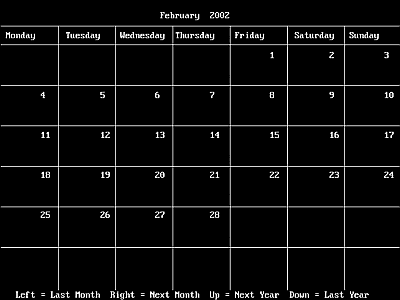
Screenshot of Calandar.bas
The program uses the steps used in weekday.bas to calculate the first day of the month. The majority of the program is actually just validating and extracting the various elements of the date, day, month and year from the user input. Actually drawing the calandar, admittedly very crudely, is done in only a score or so of lines.
DECLARE SUB InErr ()
DECLARE SUB GetCmmnd ()
DECLARE SUB DrawCal ()
DECLARE SUB GetDay ()
DECLARE SUB GetDate ()

'Calandar.bas    Ray Thomas      September 2000

DIM SHARED Month AS LONG
DIM SHARED Year AS LONG
DIM SHARED DMY AS INTEGER
DIM SHARED WeekDay(8) AS STRING
DIM SHARED CalMonth(12) AS STRING
DIM SHARED CalYear AS STRING
DIM SHARED CurMonth AS STRING
DIM SHARED IntMonth AS INTEGER
DIM SHARED IntYear AS INTEGER
DIM SHARED MonthDays(12) AS INTEGER
DIM SHARED Cmmnd AS STRING
DIM SHARED UserDate AS STRING
DIM SHARED InError AS INTEGER

DATA Sunday,Monday,Tuesday,Wednesday,Thursday,Friday,Saturday,Sunday
DATA January,February,March,April,May,June,July
DATA August,September,October,November,December

'*** Fill the Weekday and Month arrays

FOR Count = 0 TO 7
        READ WeekDay$(Count)
NEXT Count
FOR Count = 0 TO 11
        READ CalMonth$(Count)
NEXT Count

CLS
LOCATE 6, 15
PRINT "Please type the month and year you want displayed"
LOCATE 8, 20
PRINT "The month can be numeric, ie 3 for March"
LOCATE 9, 13
PRINT "or at least the first three letters ie Mar for March."
LOCATE 11, 23
PRINT "The year may be in the format YYYY"
LOCATE 12, 9
PRINT "or YY, in which case it is assumed that it is in this century"
LOCATE 13, 5
PRINT "or may be omitted, in which case it is assumed this year is required."
LOCATE 15, 21
PRINT "Just press Enter for the current month."
LOCATE 22, 5
PRINT "I've not checked all the possibilities of this program but it should"
LOCATE 23, 10
PRINT "at least be accurate between January 1800 and December 2100"

DO
        InError = 0
        GetDate                 'Get the month and year
LOOP UNTIL InError = 0

DO
        CurMonth$ = CalMonth(Month - 1) + " " + STR$(Year)
        IntMonth = Month
        IntYear = Year
        GetDay                  'Get the day of the first of the month
        DrawCal                 'Draw the calendar
        GetCmmnd                'Get user commands
LOOP UNTIL Cmmnd$ = CHR$(27)
END

SUB DrawCal
'*** Draw the calendar

SCREEN 11
CLS
LOCATE 2, 40 - (LEN(CurMonth$) / 2)
PRINT CurMonth$
XPosn = 2
FOR Count = 1 TO 7
        LOCATE 4, XPosn
        PRINT WeekDay$(Count)
        XPosn = XPosn + 11.5
NEXT Count
LINE (0, 40)-(640, 40)
XPosn = 92
YPosn = 70
DO
        LINE (XPosn, 40)-(XPosn, 480)
        XPosn = XPosn + 92
        LINE (0, YPosn)-(640, YPosn)
        YPosn = YPosn + 65
LOOP UNTIL XPosn > 640
IF DMY = 0 THEN DMY = 7
XPosn = 8 + ((DMY - 1) * 11.5)
YPosn = 6

'*** Calculate how many days in the month

LastDay = 31
IF INSTR("AprJunSepNov", LEFT$(CurMonth, 3)) THEN LastDay = 30
IF LEFT$(CurMonth$, 3) = "Feb" THEN
        LastDay = 28
        IF IntYear MOD 100 <> 0 AND IntYear MOD 4 = 0 THEN LastDay = 29
        IF IntYear = 2000 THEN LastDay = 29
END IF
FOR Count = 1 TO LastDay
        LOCATE YPosn, XPosn
        PRINT Count
        XPosn = XPosn + 11.5
        IF XPosn > 80 THEN
                YPosn = YPosn + 4
                XPosn = 8
        END IF
NEXT Count
END SUB

SUB GetCmmnd
        LOCATE 30, 4
        PRINT "Left = Last Month  ";
        PRINT "Right = Next Month  ";
        PRINT "Up = Next Year  ";
        PRINT "Down = Last Year";
        DO
                Cmmnd$ = INKEY$
        LOOP UNTIL Cmmnd$ <> ""
        IF LEN(Cmmnd$) = 2 THEN Cmmnd$ = RIGHT$(Cmmnd$, 1)
        SELECT CASE Cmmnd$
                CASE "2", CHR$(80)
                        Year = IntYear - 1
                        Month = IntMonth
                CASE "4", CHR$(75)
                        Month = IntMonth - 1
                        Year = IntYear
                        IF Month = 0 THEN
                                Month = 12
                                Year = Year - 1
                        END IF
                CASE "6", CHR$(77)
                        Month = IntMonth + 1
                        Year = IntYear
                        IF Month = 13 THEN
                                Month = 1
                                Year = Year + 1
                        END IF
                CASE "8", CHR$(72)
                        Year = IntYear + 1
                        Month = IntMonth
                CASE ELSE
                        Year = IntYear
                        Month = IntMonth
        END SELECT
        UserDate$ = LTRIM$(STR$(Month)) + " " + LTRIM$(RTRIM$(STR$(Year)))
END SUB

SUB GetDate

DIM Num AS INTEGER

LOCATE 17, 30
LINE INPUT ; UserDate$

'*** Get the month and year

IF UserDate$ = "" THEN UserDate$ = LEFT$(DATE$, 2)

Num = INSTR(UserDate$, " ")
IF Num > 0 THEN
        StrMonth$ = UCASE$(LEFT$(UserDate$, Num))
ELSE
        StrMonth$ = UCASE$(UserDate$)
END IF
StrMonth$ = LEFT$(StrMonth$, 3)
IF Num > 0 THEN
        Year = VAL(RIGHT$(UserDate$, LEN(UserDate$) - Num))
END IF
AddYear = VAL(RIGHT$(DATE$, 4))
IF Year < 100 THEN Year = Year + AddYear

Num = INSTR("JANFEBMARAPRMAYJUNJULAUGSEPOCTNOVDEC", StrMonth$)
IF Num > 0 THEN
        Month = (Num + 2) / 3
ELSE
        Num = INSTR("0123456789", LEFT$(StrMonth$, 1))
        IF Num > 0 THEN
                Month = VAL(StrMonth$)
                IF Month = 0 OR Month > 12 THEN InErr
        ELSE
                InErr
        END IF
END IF
END SUB

SUB GetDay
'*** Get the day of the first of the month

Day = 1

'*** For any date in Jan or Feb add 12 to the month and
'*** subtract 1 from the year

IF Month < 3 THEN
        Month = Month + 12
        Year = Year - 1
END IF

'*** Add 1 to the month and multiply by 2.61
'*** Drop the fraction (not round) afterwards

Month = Month + 1
Month = FIX(Month * 2.61)

'*** Add Day, Month and the last two digits of the year

NewYear$ = LTRIM$(STR$(Year))
Year = VAL(RIGHT$(NewYear$, 2))
DMY = Day + Month + Year
Century = VAL(LEFT$(NewYear$, 2))

'*** Add a quarter of the last two digits of the year
'*** (truncated not rounded)

Year = FIX(Year / 4)
DMY = DMY + Year

'*** Add the following factors for the year

IF Century = 18 THEN Century = 2
IF Century = 19 THEN Century = 0
IF Century = 20 THEN Century = 6
IF Century = 21 THEN Century = 4
DMY = DMY + Century

'*** The day of the week is the modulus of DMY divided by 7

DMY = DMY MOD 7
END SUB

SUB InErr
        InError = 1
        LOCATE 17, 30
        PRINT "   Invalid input   "
        DO
        LOOP UNTIL INKEY$ <> ""
        LOCATE 17, 30
        PRINT "                   "
END SUB
There is a problem that we come across quite often. Suppose a database field contains a date and you need to identify those records where that date falls between a range of given dates. QBasic, in common with other languages, does not contain date routines, but a bit of lateral thinking makes this problem a doddle to solve.
Suppose the date in the database is in the form dd/mm/yyyy. The actual format doesn't matter as the information needed is easily extracted however it is presented. The first thing to do is to seperate out the day, month and year. In the example above this can be done by
DIM NumYear AS LONG
DIM NumDate AS LONG

DataDate$ = 12/08/1958
NumYear = VAL(LEFT$(DataDate$,4)	(1958)
NumMonth = VAL(MID$(DataDate$,4,2)	(8)
NumDay = VAL(RIGHT$(DataDate$,2)	(12)

NumYear = NumYear * 10000		(19580000)
NumMonth = NumMonth * 100		(800)

NumDate = NumYear + NumMonth + NumDay	(19580812)
Now suppose you want to find if this date falls between 1st April 1955 and 31st March 1960. This is done by converting these two dates to a number in a similar way to the date in the database and comparing the three numbers.
IF NumDate > 19550401 AND NumDate < 19600331 THEN
	............
	............
ELSE
	............
	............
END IF
The programs on this page, like all the programs written for this site, can be downloaded from the DLoads page.
QBasic | Errors | 40lb Weight | Bits | Chance | Colours | Dates | Delays | File Dialog | Files | Input | Matching | Menus | Mouse | Numbers | SeqNo | SIRDS | Sorts | Text | Timer | DLoads
HomePage | Optical Illusions | War Stories | QBasic | Dads Navy Days | Bristol | Bristol, USA | Bristol, Canada | Terre Haute | Miscellany | Web Stuff | About Ray | Site Map | Site Search | Messages | Credits | Links | Web Rings
